Requesta Logo

requesta

How Requesta Works

Your Seamless Service Connection Platform

1
Get Started: Download & Setup

Begin Your Requesta Journey

Requesta revolutionizes how clients connect with trusted professionals across diverse industries—from emergency paramedics and vehicle towing to tax consultants and holiday rentals.
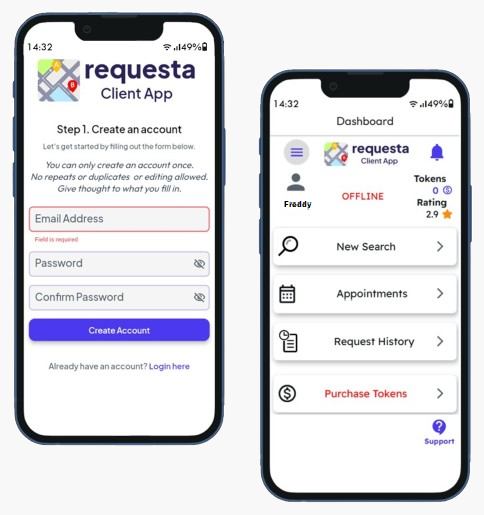
Download App

  • Clients: Requesta Client App
  • Providers: Requesta Service Provider App (available after client registration)

Create Your Profile

  • Service Provider to Verify identity
  • Upload profile/business photos
  • Add service categories
  • Service available within single-country borders

Purchase Tokens

  • Buy token batches within the App using Secure Online Payment Platform. (minimum 6 tokens)
  • View real-time pricing in-app
  • 2 Free tokens on first registration
  • Tokens never expire and are non-transferable
  • Tokens are non-refundable
Register as a client first—service providers must start as verified clients!
Download and setup process
2
Find or Offer Services

For Clients:

Search & Filter

  • Set service type required
  • Set location
  • Set search radius • Filter by service type, rating, or distance
  • View provider details: Gallery photos • Videos • Ratings • Location

Choose Request Type

  • Standard Request: Free to send • Provider responds within 10 min
  • ASAP Request: Costs 1 token (deducted if accepted) • Providers have 5 min to accept • Must start within 2 hours

For Providers:

Advertise Your Service

  • Set Service Type offering
  • Set static/mobile location • Showcase work via photos/videos
  • Set Radius limit

Receive Requests

  • See client's location, rating, and service need
  • Accept/decline within 10 min
  • ASAP requests require immediate response
Finding and offering services
3
Connect & Navigate

Real-Time Matching

  • App notifies both parties upon acceptance
  • Mutual profiles unlocked

Smart Travel Routing

  • Google Maps/Waze integration guides traveling party
  • Live location sharing
  • In-app chat/voice calls

Travel Token Logic

  • ONLY traveling party pays 1 token (client or provider)
Key Feature: Service Provider decides who travels! Client to provider OR provider to client.
Navigation and connection process
4
Schedule Appointments (If Needed)

Flexible Scheduling Options

When immediate service isn't possible, Requesta provides flexible scheduling options to ensure your needs are met at the most convenient time.
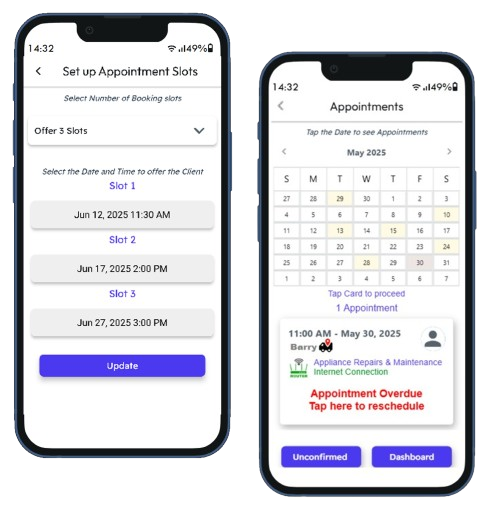
If provider isn't available immediately:

  1. Provider proposes up to 3 time slots
  2. Client selects one option → Booking confirmed

At appointment time:

  • When Service Provider is on Route Travel routing activates
  • Tokens deducted from traveling party
Scheduling appointments
5
Complete Service & Rate

Arrival Notification

  • App alerts both parties when traveling party arrives

Service Delivery

  • Conduct transaction at meeting point
  • All transactions between Client and Service Provider are commission-free

Rate Your Experience

  • Mutual 5-star rating + comments
  • Warmer-colored stars for active users
  • Ratings visible to all future connections
Completing service and rating
6
Token Management

Token System Overview

Tokens power the Requesta ecosystem. Here's how they work:

Action Token Cost Notes
Send Standard Request Free No token deduction
Send ASAP Request 1 token Deducted only if accepted
Travel to Other Party 1 token Paid by traveller only
Create Appointment 1 token Deducted at booking confirmation
Refer a New User Earn 2 tokens Credited when referee subscribes

Purchase Batches

6, 12, 25, or 50 tokens

Token Validity

Tokens remain valid indefinitely

Balance Alerts

Get in-app alerts to top up when balance is low

Token management
7
Safety & Compliance

Verified Service Providers

All vetted during registration

Two-Way Ratings

Screen clients/providers before accepting requests

Data Security

GDPR/POPIA compliant • End-to-end encryption

Report Issues

Block users + email support@requestamobile.com

Safety and compliance

Ready to Start?

"Requesta puts control in your hands—connect confidently, transact transparently."

Download App

Download the App

Download the Client App from the platform suitable for your device. The Service Provider App is available only through the Client App.
Download on the App Store Get it on Google Play